

Big Copilot features are coming, and they’ll take AI beyond chat into real, task-based work. This blog post is a quick primer on how AI works, why prompts matter, and how to use it without wasting time or money -helping you get ready for the exciting stuff coming next.
How does AI work, technically?
Technically, Copilot-style AI runs an inference pipeline on cloud GPU infrastructure. Your prompt is tokenised, combined with permitted Microsoft 365 context through Graph and retrieval, then passed through a transformer model that uses self-attention to weigh the relevant context and predict the next token. The generated response is then checked against grounding, security and policy controls before it appears in the app.
| User prompt | Tokenisation | Graph + retrieval | Transformer model | Policy checks | Response |
| Ask, files or chat context | Text split into model-readable units | Permitted work data added | Attention + next-token prediction | Security, grounding and safety controls | Generated answer in the app |
What Drives AI Costs and Response Quality?
Every AI request has a price. You pay for what you send and for what the AI writes back, and the newer “agentic” features are metered directly. So good habits keep costs sensible and answers sharp. Two ideas make the rest click into place: tokens and context windows.
What is a token?
A token is the basic unit of text an AI reads. Models do not read whole words. They use a method called byte-pair encoding to break text into chunks: whole words, common word-pieces such as “encod” and “ing,” and punctuation. Spaces and capital letters count too.
A handy rule of thumb for English: one token is about four characters, or roughly three-quarters of a word, so about 750 words fill 1,000 tokens. The easiest way to get a feel for it is to paste one of your own sentences into a tokenizer (like this one) and read the count off the screen.
Why care? Everything is counted in tokens: what you send (input) and what the AI writes back (output). Usage is metered as input tokens plus output tokens. The catch most people miss:
Output tokens usually cost more, often 2 to 8 times as much per token. A long, rambling answer runs up the bill faster than a long question.
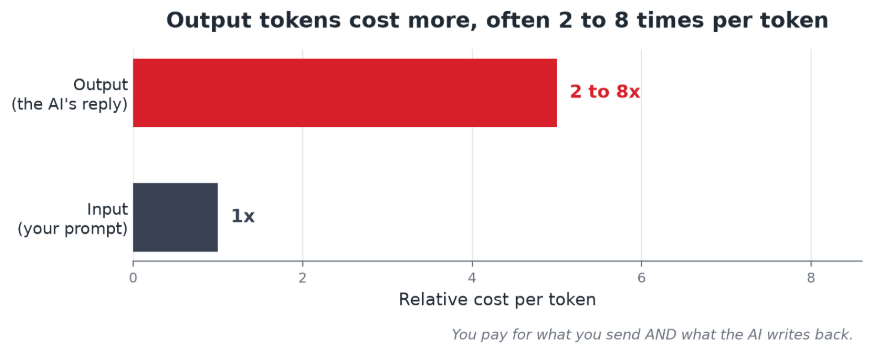
For example, 1,000 input tokens plus a 500-token reply might cost about US$0.009, and the reply is the expensive part. Longer prompts and longer answers cost more. Fun fact, the same sentence also uses more tokens in many other languages than in English. Concise English prompts are the most economical.
Context windows: the AI’s working memory
Every model has a context window, the most text it can hold in mind at once. It covers your conversation history, the system instructions, and any reference material in the prompt.
Capacities vary widely. Older models held about 4,000 tokens; newer ones 8,000 or more; today’s advanced models run from around 200,000 tokens to over a million.
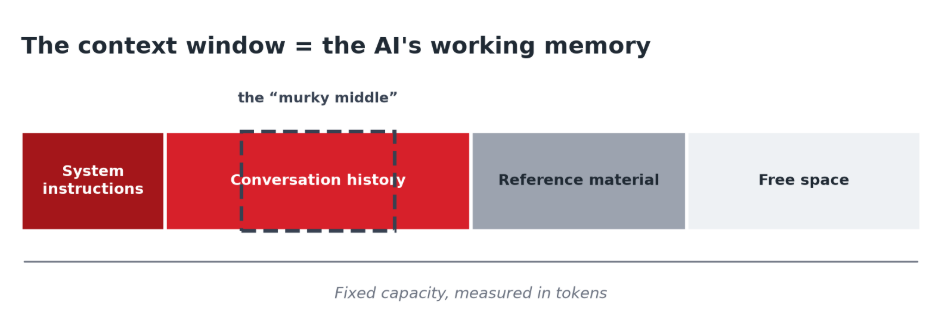
Once the window is full, the model cannot see earlier content. It drops or summarises older text to make room (sometimes called compaction). This is why AI seems to “forget” instructions in a long chat: the detail has scrolled out of view, not been ignored.
The science bit – why long context costs more:
AI reads using a mechanism called self-attention, which compares every token with every other token. Picture a room where everyone shakes hands with everyone else: 10 people make 100 handshakes, but 20 people make 400, and 40 make 1,600. Double the text and you roughly quadruple the work. That is why a long prompt or a long chat history is not just a little slower and pricier; the cost grows faster than the length itself.
There is also the “murky middle.” The phrase is informal, popularised by Dharmesh Shah CTO of HubSpot, but the effect is well documented.
A Stanford study, “Lost in the Middle,” found that models use information best when it sits at the start or end of a long input, and accuracy “significantly degrades” for facts buried in the middle. A 2025 benchmark saw even a leading model fall from 99.3% to 69.7% accuracy as its context grew to 32,000 tokens. Fill a model with a whole book and it tends to gloss over the detail in the middle.
The takeaway: a bigger window is a capacity, not a guarantee. Keep the context clean, and put the things that matter near the start or the end.
Four practical habits for getting value out of AI
- Keep prompts concise and relevant. “Please do X, if at all possible…” is just “Do X.” Cut filler. Send an excerpt, not the whole document.
- Structure your input and name the output you want. Bullet points and clear asks guide the AI. “Give me 3 bullet points” keeps those pricey output tokens in check.
- Manage long conversations. After a lot of back-and-forth, ask for a short summary, then start fresh from it. Stale content stops cluttering the window.
- Schedule recurring tasks deliberately. Background jobs are useful, and each run has a cost. Schedule only what you will use, and review or disable the rest.
Finding the sweet spot: balancing efficiency and quality
Token efficiency does not mean “use the fewest words.” It is a balance:
- Too little context leads to vague, off-target answers.
- Too much irrelevant context distracts the model, drops accuracy, and costs more.
A big context window is a capacity, not an invitation to fill it. Give the AI exactly what it needs, no more and no less. Include a long background section when it earns its place; cut it when it is padding. Use enough tokens to be clear.
Two AI myths worth busting
“A very detailed prompt guarantees a better answer.” Not necessarily. Padding and pleasantries add tokens, not intelligence. A clear, concise prompt beats a long, vague one.
“Only my prompt length affects cost.” Nope. The reply is metered too, and output tokens cost more per token than input. Ask for the length you actually need.
Want to Learn More About AI and Copilot?
The organisations seeing the biggest returns from AI are not necessarily spending the most. They are building good habits, understanding how the technology works and helping their teams use it with confidence.
Our upcoming webinar Beyond Copilot: The Advanced AI That’s Reshaping Modern Business will explore practical ways to use Microsoft Copilot and other AI tools to save time, increase productivity and deliver real business value.
If you’re ready for something a bit more in-depth check out our upcoming learning series Copilot Launchpad, our free five-part series designed for business leaders looking to drive adoption, improve productivity and get more from their Copilot investment – we’ll show you how to get more value from the Microsoft 365 tools you already use every day.